Billing, Renewals and Cancellation
Table of Contents
This page explains how paying for a HardGaming server works, from the day you buy it to the day you cancel. It applies to every server on every plan, whichever game you host. For where to find each control on your Billing page, see How to Manage Billing and Cancel a Server.
How Does Billing Work?
Every server is its own monthly subscription. It renews on the same day each month as the day you bought it, and the renewal is charged automatically to the card saved on that subscription.
If you buy on the 29th, 30th or 31st, months without that date renew on their last day instead, then go back to your original day. A server bought on January 31 renews on February 28 (February 29 in a leap year), then on March 31.
All prices are in US dollars, and no tax is added at checkout. You pay the price shown on the plan.
Your Billing page shows each server's next renewal date. Open DETAILS on a server to see its NEXT BILLING date, the card it is charged to, and every charge so far under ACTIVITY HISTORY.
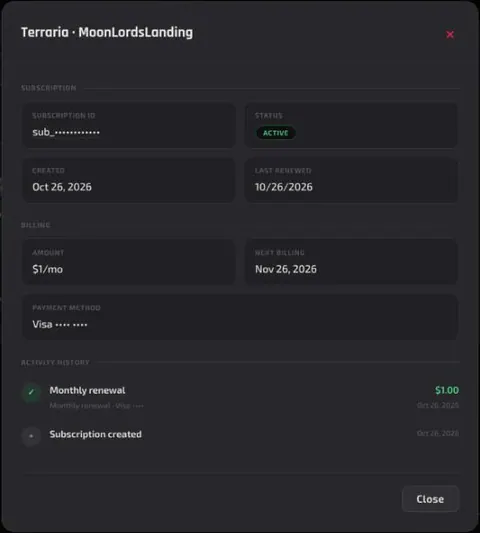
You can change the card a server is charged to at any time from your Billing page, using CARD on that server.
When a Payment Fails
If a renewal payment doesn't go through, your server stays online while the payment is retried automatically over the following days. Each payment failed email tells you the date of the next retry.
You don't have to wait for it. A red Payment failed bar appears at the top of your Billing page:
- With one failed payment, click Retry Payment on the bar.
- With more than one, click Update Payment Method on the bar, or Retry next to each server listed under it.
Once a payment succeeds, everything carries on as normal, and you get an email saying it's all sorted.
If every retry fails, the subscription is cancelled and the server is paused straight away. It is permanently deleted 15 days later, unless you resume the subscription before then.
Tip: Make a DeepSave as soon as a payment fails. A paused server can't be DeepSaved.
Upgrades and Plan Changes
You can add memory, storage or backup slots to a server at any time with UPGRADE on your Billing page. You pay a prorated charge today that covers the rest of your current period, and the new monthly price applies from your next renewal.
Two limits apply:
- No upgrades while a payment is overdue. Settle the payment first.
- Plans can't be downgraded. To move to a smaller plan, cancel the server and order a new one. Save your world with DeepSave first so you can bring it across.
Cancelling and the Grace Period
Cancelling doesn't switch your server off on the spot:
- Until the end of your paid period, the server keeps running as normal.
- For the next 15 days, the server is paused, and your data is kept. Its page shows only a Server Suspended screen with a Go to Billing button.
- After those 15 days, the server and all of its files are permanently deleted.
While a server is paused you can't open its panel or make a DeepSave of it. Any DeepSave you made earlier is kept separately and can still be downloaded.
Warning: Deletion can't be undone. To keep a world, make a DeepSave before you cancel. A DeepSave stays in your account after the server is gone, and you can rebuild a server from it later.
Resuming a Server
What resuming costs depends on when you do it:
- Before your paid period ends, resuming undoes the cancellation. There's no charge, and your renewal date stays the same.
- During the 15 days the server is paused, you're charged straight away and a new monthly period starts that day. A coupon that is still valid carries over.
- After a failed payment, resuming pays the bill that is owed.
Emails We Send
We keep emails to the ones you need: something has gone wrong, something needs your attention, or something has changed. That's why there's no email before a normal renewal, or at the moment you cancel. You will get one when:
- A payment fails, one for each unpaid bill.
- Your bank asks for extra verification of a payment.
- A payment goes through after a failure.
- A server is paused, with a subject telling you that you have 15 days to bring it back.
- Three days before a paused server is deleted, and again once it has been deleted.
- You resume a server.
Coupons
How long a coupon lasts depends on the coupon. Some apply to the first month only, some for a set number of months, such as three, and some to every renewal.
To see a coupon, click DETAILS on the server's card. Under BILLING, the AMOUNT shows the full price crossed out next to the discounted one, with a label such as 20% off (for 3 months) or 20% off (ongoing). When any server has a coupon, the MONTHLY RATE box at the top of the Billing page says After discounts.
Upgrading a server keeps its coupon, unless you apply a new one. Resuming a paused server carries the coupon over too, as long as it is still valid.
Refunds
Refunds are considered case by case, with no fixed window or set of conditions. If you're unhappy with your service, get in touch through any of the channels under Need Help?, and the support team will work with you to see whether a refund is an option.
Next Steps
- Manage billing, upgrade or cancel a server
- Keep your world after a server is deleted with DeepSave
- Tour your server dashboard
Looking for your next world? Browse every game we host and have a server running in minutes.
Need Help?
If you run into any issues, the HardGaming support team is here for you:
- Forum: ask the community and search past answers
- Email: support@hardgaming.tech
- Live Chat: use the chat widget on hardgaming.tech
- Discord: join our community for quick help
Happy gaming! 🎮